Battery or Hardwired: Powering Smart Shades in Westfield
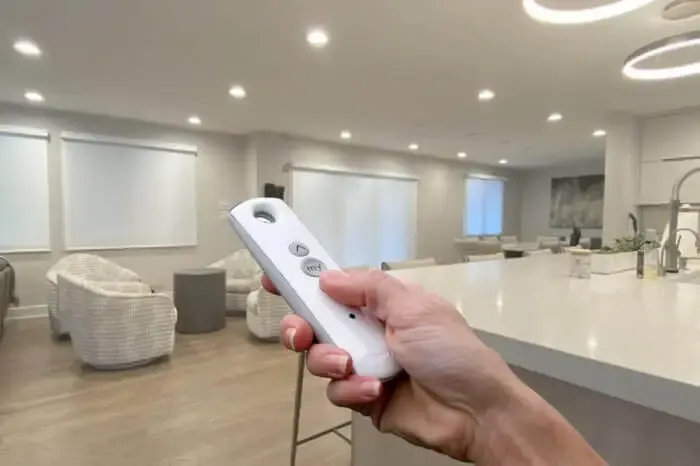
Motorized shades and smart shades get talked about like they're the same thing, and they are not quite. One is a shade with a motor in it. The other adds a layer on top that lets an app or a voice assistant reach that motor. Here is how the pieces actually fit together for a Westfield home.
How Motorized Shades Actually Work
Before ordering, ask exactly how the motor is powered. Most are either a rechargeable battery pack or hardwired to line voltage, and a few budget kits still use disposable batteries. That answer changes the install entirely, including whether an electrician needs to be involved, and it's not always obvious from a product photo or a showroom display.
Ask what's needed to get app and voice control, specifically, not just "is it smart." Some motors need a proprietary hub sold separately. Others build networking into the motor itself, no separate hub required, though that's still the less common setup as of 2008.
And ask what happens with just the remote, no hub, no app, since that's the fallback you'll be living with the moment your Wi-Fi has a bad day or the hub needs a reset. A Westfield installer who's actually set up more than a handful of these systems, not just sold them, should be able to answer all of that without checking a spec sheet.
Battery Life and Charging in the Real World
The most common "my smart shade stopped working" call turns out to be a dead battery, not a broken motor or a network problem. The shade responds slowly, then not at all, and it looks like a bigger issue than it actually is.
Cold rooms make this worse and confuse the diagnosis further. A shade that's been fine all summer can start acting sluggish once a Westfield winter sets in, simply because cold temperatures reduce how much power a lithium battery can deliver at once, not because anything broke.
We've also seen solar panels mounted in the wrong spot, behind a curtain or tucked under an eave where it never actually sees direct sun, which defeats the purpose entirely. A solar add-on only helps if it's getting hit by real sunlight for a meaningful part of the day.
Voice Control and the Hub Question
Alexa and Google Home are voice platforms, not the company that made your shades, and the same is true of Apple's Home platform. In almost every case, the shade motor talks to its own manufacturer's hub first, and that hub is what actually connects out to the voice platform through a skill or an integration.
Apple's system, Home, has historically been the strictest about this, generally wanting a hub built specifically for that ecosystem, or a compatible bridge, in the chain before a shade shows up as an accessory. Z-Wave and Zigbee are two other low-power standards some shade brands build into their motors directly, and each needs a hub that speaks that specific protocol.
A newer standard, Matter, is meant to smooth all of this out by letting devices work across ecosystems without as much brand-specific bridging. Some newer hubs support it, but plenty of shades already installed in Westfield homes predate it and still rely on their original manufacturer hub.
What Actually Fails in a Smart Shade System
Fixing a connectivity issue is almost always cheaper than people expect, since it's usually a settings problem, not a hardware failure. Re-pairing a hub or replacing a battery costs little compared to what a homeowner sometimes assumes when a shade stops responding.
Where actual cost comes in is a motor that's mechanically worn out, gears that have degraded after years of heavy daily cycling. That's a real repair, sometimes a replacement, and it's the minority case rather than the norm for Westfield smart shade service calls.
Extending a hub's range with an additional bridge or repeater is a relatively small added cost that solves a lot of intermittent connection issues in a larger home, and it's worth budgeting for upfront rather than treating it as an afterthought.
Power Planning and Backup Control
A whole-home project is the right time to plan which shades group into which scenes. That grouping happens at the hub level, so it's worth mapping out room by room before the order goes in. A few common examples:
- Morning light easing into the kitchen on a set schedule.
- A movie-night setting that drops every shade in the media room at once.
- An all-open setting for cleaning day that opens the whole house together.
For a primary bedroom in a Westfield home, a wall-mounted keypad near the bed is often a nicer everyday solution than digging out a phone half asleep, and it still works if the network is having a bad night.
Weighing battery against hardwired, or one ecosystem against another, is easier with actual product in hand rather than a spec sheet. A free in-home measure lets you see and hear a motor running before you commit to a whole-house system.
Frequently Asked Questions
Should I choose battery or hardwired shades?
It depends on how often the shade will be used and how easy it is to run power to that window. A shade that gets adjusted constantly, or one that is hard to reach for charging, is often a better fit for hardwired. A shade used once or twice a day in an easy-to-reach spot works fine on battery.
Does a solar panel really extend battery life?
It can, but only if it gets real direct sun for a meaningful part of the day. A solar add-on mounted on a shaded or north-facing window will not help much, since it needs consistent light to actually offset what the motor is using.
What should I ask before choosing a smart home hub?
Ask exactly which voice platforms it supports by name, not just whether it is labeled smart home compatible, and ask how it performs at a distance from your router, since range varies by hub. A firmware update's track record with existing schedules and scenes is also worth asking about, since that says a lot about how stable the system actually is.
 Blind Repair in Westfield: What Actually Breaks and Why
 Do You Need Blackout, or Will Room Darkening Get the Job Done
 Do Your Westfield Windows Need Inside Mount or Outside Mount Blinds?